Import OGS Games to StoneBase — AI Review in 3 Clicks
Published on April 13, 2026 by StoneBase Team
If you play on the Online Go Server (OGS), you already have a library of games waiting to be reviewed. StoneBase’s OGS integration lets you browse and import those games directly, no manual SGF downloads required.
This guide walks you through the process.
What Is the OGS Integration?
StoneBase connects to the OGS public API to fetch any player’s game history. You search by username, see the full list of games, and import the ones you want into your local library with a single click. Once imported, a game is just like any other in StoneBase: you can run KataGo analysis, annotate moves, and search by position.
How to Import Games
Step 1: Open the OGS Page
In StoneBase’s sidebar, click Servers, then select OGS. This opens the OGS Games panel.
Step 2: Search for a Player
Type an OGS username into the search field and click Search. StoneBase will fetch that player’s game history from OGS.
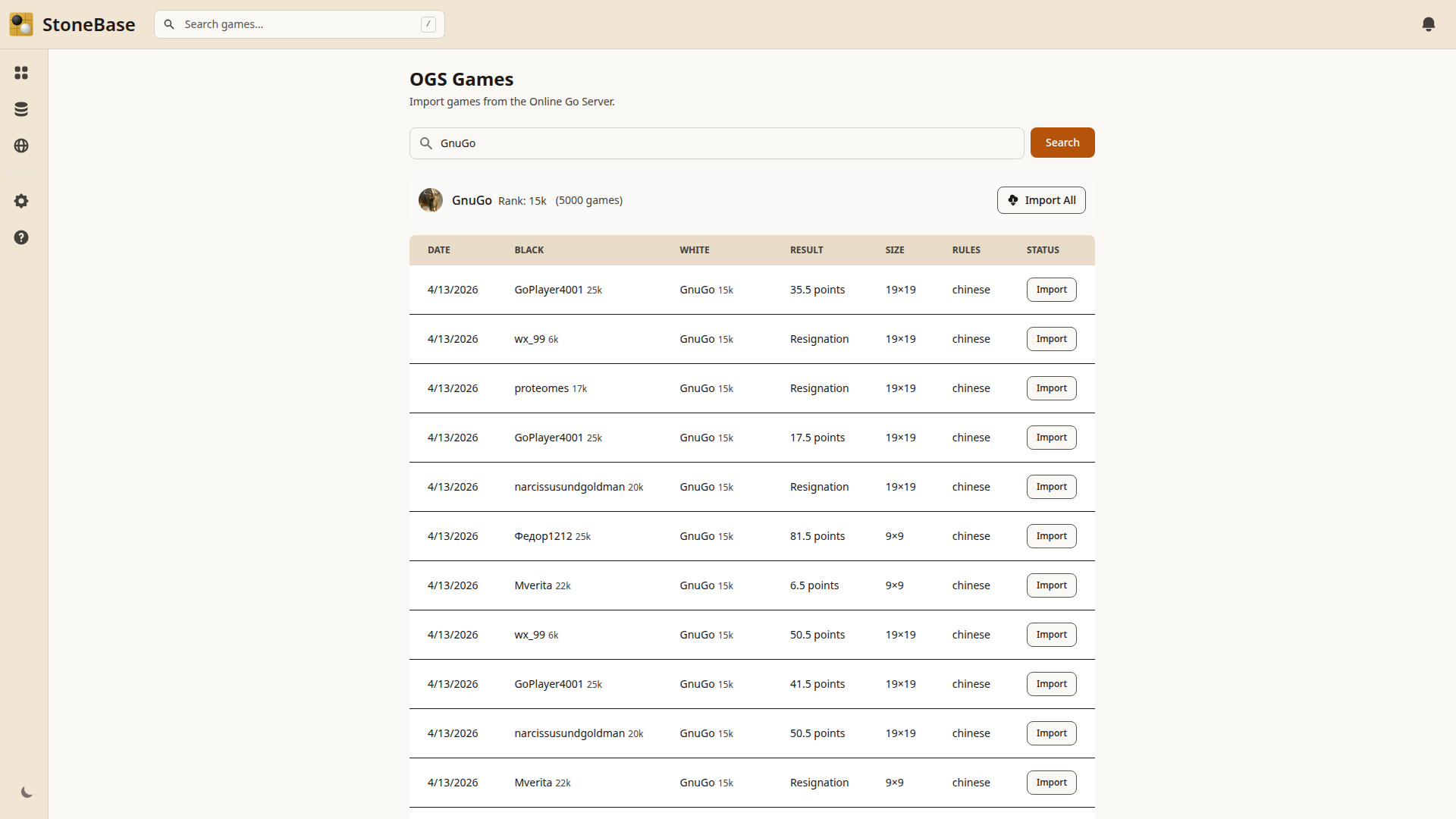
You’ll see a table with each game’s date, players, result, board size, and rules. Games you’ve already imported are marked so you don’t duplicate them.
Step 3: Import Games
You have two options:
- Import individually: Click the Import button next to any game to bring it into your library.
- Import All: Click the Import All button at the top to import every game in the list at once. This is useful when you’re setting up StoneBase for the first time and want your full game history.
Step 4: Review
After importing, click on any game in the OGS list to go directly to the board view. From there, you can run AI analysis, explore variations, and review the game just like any other in your collection.
Tips for Getting the Most Out of OGS Import
Import your own games first. Start with your own username to build your personal game library. This gives you the most value from StoneBase’s review and position search features.
Study opponents before a match. If you know your next tournament opponent’s OGS username, import their recent games and look for patterns in their openings and fighting style.
Combine with AI analysis. The real power comes after import. Run KataGo analysis on your OGS games to see where you went wrong and what you could have done differently. The score graph and candidate moves show you exactly where each game turned.
Use position search across imported games. Once you’ve imported a large number of games, StoneBase’s position search lets you find every game where a specific board pattern appeared, revealing trends you wouldn’t notice otherwise.
Related Articles
- How to Review Your Go Games: A Beginner’s Guide — A complete workflow for reviewing your imported games.
- How to Set Up KataGo for Go Game Analysis — Get KataGo running so you can analyze your OGS games with AI.
- How to Search Your Go Game Collection by Board Position — Find recurring positions across your imported game library.
Ready to analyze with AI?
If you haven't set up KataGo yet, check out our complete KataGo setup guide — it covers Windows, Mac, and Linux installation in minutes.