Customize Your Go Board: Board Appearance in StoneBase
Published on April 13, 2026 by StoneBase Team
The way your Go board looks matters. Whether you prefer the warm glow of a traditional kaya board or the clean lines of a minimal design, StoneBase lets you choose the board and stone style that suits your taste.
Board Themes
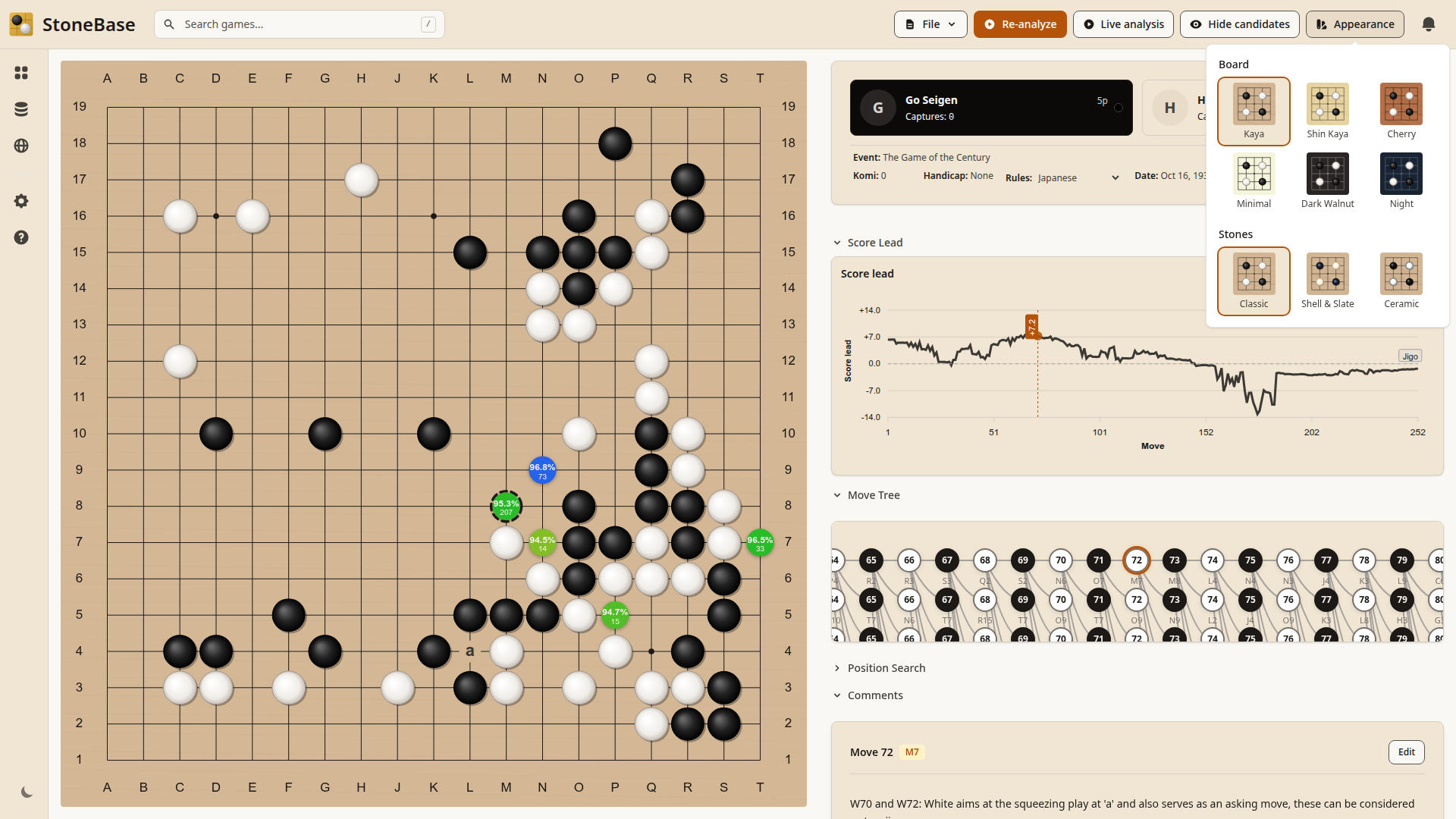
StoneBase offers six board themes, each with a distinct character:
- Kaya: The classic. A warm, natural wood grain that mimics a traditional Japanese kaya board. This is the default and what most players are familiar with.
- Shin Kaya: A lighter, slightly paler wood. Popular among players who want a traditional look with a bit more brightness.
- Cherry: A rich, reddish-brown wood with warm undertones. Gives the board a distinctive, elegant feel.
- Minimal: Clean and simple. A pale, unadorned board that puts all the focus on the stones and the position. Great for study and analysis.
- Dark Walnut: A deep, dark wood grain. Ideal for players who want a sophisticated, subdued look without going full dark mode.
- Night: A dark board theme for low-light environments. Easy on the eyes during late-night review sessions.
Stone Styles
You can also choose how your stones look:
- Classic: Solid black and white stones with a subtle gradient. The standard look.
- Shell & Slate: Textured stones that resemble real shell (white) and slate (black) stones. Adds a natural, tactile feel to the board.
- Ceramic: Smooth, flat stones with a matte finish. A modern, clean aesthetic.
How to Change Appearance
Changing your board appearance takes a few seconds:
- Open any game in the board view
- Click the Appearance button in the top toolbar
- Select your preferred board theme and stone style
- The change applies immediately, no restart needed
Your choice is saved and persists across sessions. You can also change appearance from Settings > Board.
Which Theme Should You Use?
There’s no wrong answer, but here are some thoughts:
For long review sessions, lighter themes like Kaya or Shin Kaya tend to cause less eye fatigue. The Minimal theme is particularly good for focused study since there’s nothing competing with the stones for your attention.
For streaming or screenshots, Cherry and Dark Walnut photograph well and add visual interest. Night mode looks striking in dark environments.
For analysis work, the key is contrast. Make sure you can clearly distinguish the stones, the analysis markers, and the candidate move indicators against your chosen board. All themes are designed with this in mind, but personal preference matters.
Related Articles
- How to Review Your Go Games: A Beginner’s Guide — Set up your board the way you like it, then dive into game review.
- How to Set Up KataGo for Go Game Analysis — Get KataGo running alongside your customized board.
- 5 Common Mistakes in Go and How AI Helps You Spot Them — See how analysis markers and candidate moves look on your chosen theme.
Ready to analyze with AI?
If you haven't set up KataGo yet, check out our complete KataGo setup guide — it covers Windows, Mac, and Linux installation in minutes.